Player 1: W
Accelerate
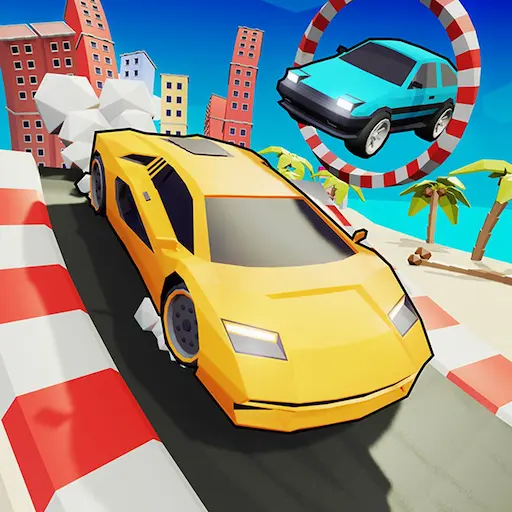
Explore a colorful 3D world, collect stars, unlock over 17 cars, conquer eight racetracks, and challenge a friend in split-screen mode.
Play Crazy Cars online for free. Explore a colorful 3D world, collect stars, unlock over 17 cars, conquer eight racetracks, and challenge a friend in split-screen mode.
Crazy Cars is an open-world 3D driving game created by No Pressure Studios. Instead of restricting you to a single racetrack, the game places you inside a colorful playground filled with roads, ramps, obstacle courses, races, collectibles, and unusual locations.
Drive freely around the map and choose which activity to attempt next. You can enter eight different races, launch your vehicle from enormous ramps, climb Mount Egg, visit the drag-racing area, or search the environment for hidden collectibles.
Stars, wrenches, and other items allow you to expand your collection of vehicles. More than 17 unique cars are available, giving you plenty of reasons to continue exploring. Crazy Cars also supports local two-player split-screen gameplay, allowing two people to drive together using the same keyboard.
Play Crazy Cars online for free in a desktop browser and explore an open-world car game filled with 3D driving, stunt car challenges, and browser racing gameplay.
This two-player car game lets you collect stars, unlock over 17 cars, conquer eight racetracks, and challenge a friend in split-screen mode.
Load the game and start driving without downloading a separate client.
Begin by driving away from the starting area and exploring the open map. Follow roads and signs to discover races, stunt ramps, obstacle courses, and collectible items.
You are not required to complete activities in a fixed order. Enter a race when you want structured competition, attempt a stunt course for a physics-based challenge, or continue exploring to gather more resources.
Collect stars, wrenches, and other objects scattered around the world. These collectibles can be used to unlock additional vehicles.
If your car falls from the map or becomes trapped, use the reset key to return it to a playable position.
Player 1 uses WASD and Player 2 uses the Arrow keys. The game is designed for desktop browser play with a keyboard.
Accelerate
Brake or reverse
Steer left or right
Accelerate, brake or reverse, and steer
Brake
Reset the vehicle
Pause the game
Crazy Cars gives you the freedom to choose your own activities. There is no need to remain on a fixed route. Exploration and experimentation are central parts of the experience.
Explore the open 3D world, compete on eight racetracks, and discover hidden parts of the map.
Collect stars and wrenches, then unlock more than 17 vehicles.
Perform jumps and stunts, complete obstacle courses, climb Mount Egg, visit the drag-racing area, and play with a friend in split-screen mode.
The Crazy Cars map acts as a giant automotive playground. Different activities are distributed throughout the environment, encouraging you to leave the main road and investigate unusual locations. Pay attention to landmarks so that you can return to your favorite challenges without becoming lost.
You may discover traditional racetracks, looping roads, and drag strips.
Large stunt ramps, obstacle courses, and elevated platforms reward timing and control.
Search collectible-filled areas, climb Mount Egg, and use open spaces for free driving.
Crazy Cars contains eight racetracks where you can test your speed and vehicle control. Racing provides a more structured challenge than open-world exploration.
Learn each track before attempting to drive at maximum speed. Observe the direction of upcoming corners, brake before tight turns, and avoid unnecessary collisions.
A faster car can provide an advantage, but good steering and route knowledge remain essential. Repeating races also helps you learn which vehicle works best for each course.
Stars, wrenches, and other collectibles are scattered across the map. Some can be found beside ordinary roads, while others may require you to complete a jump or explore a less obvious area.
Collectibles contribute to vehicle progression and give you a reason to examine the entire environment. Check behind large objects, explore elevated roads, look around stunt areas, follow unfamiliar paths, search both sides of the racetracks, and use ramps to reach high locations.
Do not worry if you cannot reach every collectible immediately. A different vehicle may make the challenge easier.
Crazy Cars offers more than 17 unique vehicles to discover and drive. New cars provide visual variety and may feel different when accelerating, steering, braking, or landing after a jump.
Choose a vehicle based on the activity you want to attempt. A fast car may perform well on a racetrack or drag strip, while a controllable vehicle can be more useful on narrow obstacle courses.
Continue gathering collectibles to expand your garage and experiment with every available car.
The open world is filled with ramps and unusual obstacles designed to launch, flip, or redirect your car. These areas reward good timing and careful control in the air.
Approach a ramp in a straight line whenever possible. Correct your direction before leaving the ground because steering options may be limited once the vehicle is airborne.
Not every jump requires maximum speed. Too much momentum can send your car beyond the landing zone or cause an uncontrolled impact.
Crazy Cars supports local two-player gameplay on the same computer. The display is divided so that each player can control a separate vehicle.
Player 1 uses WASD, while Player 2 uses the Arrow Keys. This allows both players to explore, race, or create their own informal driving challenges.
Before starting, make sure both players understand their controls. Avoid pressing keys assigned to the other vehicle, especially when using a compact keyboard.
Drive around the map and learn where activities are located. Familiarity with the environment makes navigation much easier.
Stars and wrenches support vehicle progression. Pick them up during exploration instead of driving past them.
Reduce your speed before entering a corner. Braking too late often causes the car to slide away from the intended route.
Approach ramps from the center and keep the car straight. A small error at takeoff can become a large error by the time you land.
Press R if your vehicle falls, flips, or becomes trapped. Resetting is usually faster than trying to recover from an impossible position.
Do not assume the fastest car is always the best. Handling and stability can be more useful on obstacle courses.
Many interesting areas and collectibles are not positioned directly beside the starting route. Explore the edges and elevated parts of the map.
Driving at full speed everywhere makes the vehicle difficult to control. Crazy Cars includes tight turns, narrow platforms, and ramps that require different approach speeds. Experiment with different activities and adjust your driving style to each one.
Avoid ignoring collectibles, entering corners without braking, approaching ramps at an angle, and using maximum speed on every jump.
Avoid repeating one activity without exploring, assuming all cars handle identically, forgetting the reset key, confusing Player 1 and Player 2 controls, and focusing only on races while missing other challenges.
Crazy Cars is a 3D driving game and browser racing game with open-world exploration, stunts, collectibles, and local two-player gameplay.
Crazy Cars combines racing, stunt driving, collecting, and open-world exploration in one accessible browser game. You can choose a structured race or simply drive around looking for something interesting.
Short activities make the game suitable for quick sessions, while vehicle unlocking and collectible hunting provide longer-term goals.
The local split-screen option also makes Crazy Cars a strong choice when two players want to share one computer and play together.
If you enjoy Crazy Cars, try more games like it:
Choose a vehicle, collect every star, and explore all the races, ramps, and hidden challenges waiting inside the open world of Crazy Cars.