Arrow keys or WASD
Player 1 or single-player: drive and steer
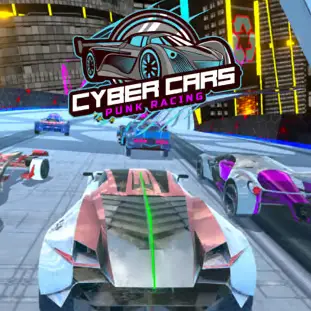
Race futuristic cars, use nitro, unlock upgrades, explore five game modes, or challenge a friend.
Race futuristic cars, use nitro, unlock upgrades, explore five game modes, or challenge a friend.
Cyber Cars Punk Racing is a futuristic 3D driving game set in a neon-lit city filled with elevated highways and high-speed racing tracks. Choose a cyber car, activate your nitro, overtake opponents, and complete events to earn money for new vehicles and performance upgrades.
The game offers much more than conventional circuit racing. Its five main modes include Career, Free Ride, Hot Chase, Battle Arena, and local Two Player competition. With 16 futuristic cars and more than 60 racing tracks, it provides an extensive browser-based driving experience for solo players and friends sharing the same computer.
Play Cyber Cars Punk Racing online in a desktop browser and race through a neon city racing game with Career events, Free Ride exploration, police chases, arena combat, and local two-player racing.
Select a futuristic car, complete races to earn currency, and spend your rewards on new vehicles and upgrades. Nitro, camera changes, and more than 60 tracks keep every session different.
No download is required. Load the WebGL game, choose a mode, and start driving with your keyboard.
Select a game mode from the main menu and choose an available car. Use the Arrow keys or WASD to drive, press the nitro key for a burst of speed, and complete events to earn money for the garage.
Select a game mode from the main menu and choose an available car. If you are playing Career mode, begin with the opening events and complete their objectives to unlock additional races.
Use the Arrow keys or WASD to accelerate, brake, and steer. Press the nitro key when you need a temporary burst of speed, and use the camera control to select a comfortable driving perspective.
Completing races and missions rewards you with currency. Spend your earnings in the garage to buy new cars, apply visual changes, and improve vehicle performance.
Win races in Career, explore and collect diamonds in Free Ride, escape police in Hot Chase, survive Battle Arena, or race against a friend in Two Player mode.
Each mode has a different objective, so choose the one that matches the kind of cyberpunk racing game you want to play.
When playing the local Two Player mode, one player generally uses the Arrow keys while the other uses WASD.
Player 1 or single-player: drive and steer
Player 1 or single-player: activate nitro
Change the camera view
Navigate menus and select options
Player 2: drive and steer
Player 2: activate nitro
Career is the principal progression mode. Race against computer-controlled opponents across futuristic tracks and complete missions to earn money. Later races introduce faster opponents and more demanding layouts. Use your rewards to improve your current vehicle or save them toward a more powerful car.
Explore the cyberpunk city without the pressure of a conventional race. Practice steering, test upgrades, learn the map, and search for collectible diamonds that can help unlock special content and vehicles.
Multiple police vehicles attempt to surround and damage your car while you try to survive. Change direction frequently and save nitro for moments when you need to escape a blockade.
Drive around the arena, collect temporary bonuses, and damage rival cars. Eliminating another vehicle can restore some health. A stationary vehicle is an easy target.
Two people compete on the same computer using a shared keyboard. One player uses the Arrow keys and N for nitro. The second player uses WASD and T. No separate accounts or online multiplayer connection is required.
Finish races ahead of your opponents and complete Career missions to unlock more events.
Earn money and diamonds so you can unlock futuristic vehicles, upgrade performance, and purchase new skins.
Escape police cars, survive arena battles, defeat a second local player, and complete more than 60 racing tracks.
Cyber Cars Punk Racing includes 16 futuristic racing cars. Each vehicle has its own appearance and performance characteristics.
Money earned from events can be used to unlock additional cars or improve the vehicle you already own. Faster cars may offer better top speed and acceleration, while other models can feel easier to control through difficult corners.
Do not purchase a new car based only on its appearance. Consider whether its performance suits the mode you want to play. A well-upgraded starter vehicle may be more useful than a newly unlocked car with no improvements.
The garage allows you to improve vehicle performance and change its visual style. Upgrade gradually and test the car after each improvement. Increased speed can help on straight roads but may require earlier braking before corners.
Engine and speed improvements help on long straights and Career races.
Acceleration upgrades and handling-related improvements make corners and overtaking easier.
Nitro upgrades help in Hot Chase escapes and close finishes.
Vehicle skins, alternative colors, and new futuristic car models let you personalize your garage.
Nitro gives your car a powerful temporary speed boost. Proper timing can decide the outcome of a close race.
The best times to activate nitro include the beginning of a long straight, after exiting a difficult corner, while overtaking an opponent, when escaping police vehicles, before a wide ramp, and after recovering from a collision.
Avoid activating nitro in the middle of a sharp turn. The additional speed may push the car away from the ideal racing line or cause a collision. In Two Player mode, save some nitro for the final section instead of using the entire supply early in the race.
Learn how your car accelerates and turns before entering a difficult Career event.
Complete the turn first, straighten the car, and then activate nitro for maximum acceleration.
Hitting barriers and opponents reduces your speed. A clean racing line is usually faster than forcing your way through every gap.
Press C to compare the available perspectives. Choose a view that lets you see upcoming corners clearly.
If opponents consistently pull away, return to the garage and improve your car before attempting the race again.
Remember the location of sharp corners, narrow roads, ramps, and long straights. Track knowledge makes nitro timing much easier.
Reduce speed before entering a corner instead of braking after the car has already begun to slide.
Explore areas outside the main road and search around ramps, elevated roads, and structures.
Driving continuously makes it more difficult for opponents to surround your vehicle.
Police cars can block predictable routes. Sudden turns and well-timed nitro bursts help create an escape path.
Nitro gives your car a powerful temporary speed boost. Proper timing can decide the outcome of a close race. Avoid activating nitro in the middle of a sharp turn.
Activate nitro at the beginning of a long straight or after exiting a difficult corner.
Use nitro while overtaking an opponent or when escaping police vehicles in Hot Chase.
Activate nitro before a wide ramp or after recovering from a collision.
Save some nitro for the final section instead of using the entire supply early in the race.
The local multiplayer mode rewards more than raw vehicle speed. Since both players share the same computer, each person must become familiar with a different control layout.
Use nitro on straight sections and avoid colliding with your opponent unnecessarily. Contact may slow both cars and allow the trailing player to recover.
If you are leading, prioritize clean driving. If you are behind, save nitro for a reliable overtaking opportunity rather than activating it while cornering. Before beginning a serious match, complete a practice race so both players can become comfortable with their assigned controls.
Cyber Cars Punk Racing is an online 3D car game with a futuristic cyberpunk racing environment and free WebGL browser gameplay.
The browser version provides immediate access to every primary mode without requiring a separate installation. Load the game, select your mode, and control the car directly with your keyboard.
Desktop play is particularly suitable for the local Two Player mode because both control schemes are available on the same keyboard. Physical keys also provide precise steering and instant access to nitro.
Cyber Cars Punk Racing runs using WebGL technology. For smoother performance, use an updated desktop browser, enable hardware acceleration, and close unnecessary background tabs.
If you enjoy futuristic vehicles and high-speed browser racing, try more games like Cyber Cars Punk Racing: